
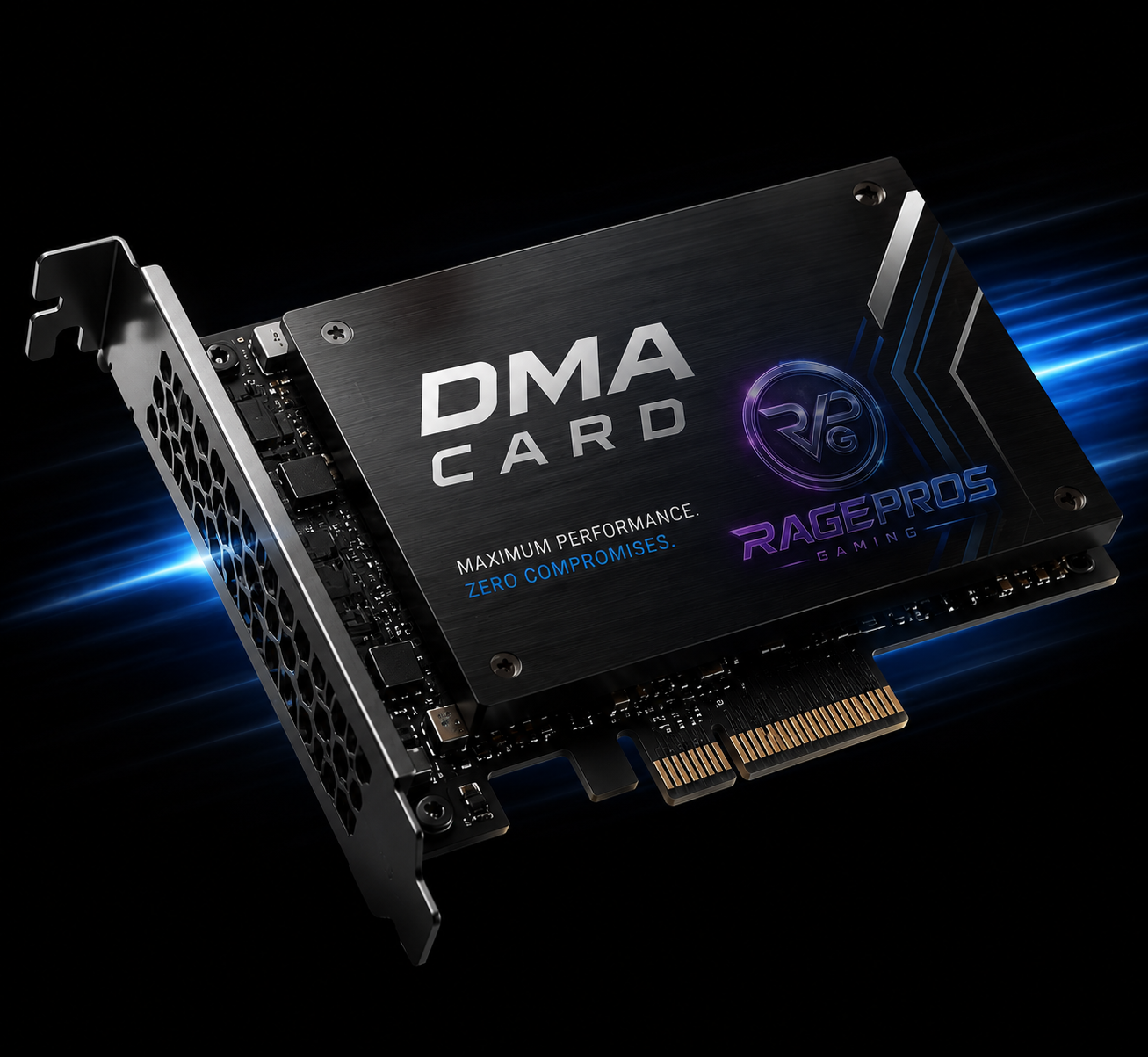
35T, 75T & 100T DMA Card Options
Choose the DMA card tier that fits your setup. RagePros offers entry-level, premium, and elite FPGA-based DMA hardware options built for stable PCIe communication, responsive operation, and clean long-term use.
35T DMA Card
The 35T DMA card is the starter-friendly option for users who want a clean FPGA-based DMA board without overbuilding their setup.
- Entry-level FPGA DMA hardware
- Good starter option for basic setups
- Stable PCIe communication support
- Common PCILeech-style compatibility profile
75T DMA Card
The 75T DMA card is the balanced premium option, commonly chosen by users who want stronger logic capacity, improved reliability, and a better long-session hardware experience.
- Premium Artix-7 style FPGA tier
- Strong balance of price and performance
- Improved throughput potential
- Popular choice for serious DMA setups
100T DMA Card
The 100T DMA card is the elite hardware tier for users who want the strongest configuration available, higher performance headroom, and a premium DMA setup foundation.
- Elite FPGA DMA hardware tier
- Maximum performance configuration
- Higher hardware headroom
- Built for premium long-term setups
Hardware Features
- FPGA-based DMA card architecture
- Stable PCIe communication support
- Low-latency hardware response
- Built for long-session reliability
- Premium PCB and component quality
Compatibility
- Supports modern AMD and Intel platforms
- Built for supported PCIe desktop setups
- Compatible with supported DMA ecosystems
- Designed for high-performance gaming PCs
- Best used with a proper two-PC workflow
Setup & Support
- Setup guidance included after purchase
- Discord support for configuration questions
- Client area instructions after checkout
- Hardware setup notes available
- Support ticket guidance included
Shipping Info
- Worldwide shipping supported
- Discreet packaging
- Tracking included with all hardware orders
- Domestic delivery usually 3–7 business days
- Processing time may vary by stock level
Which DMA Card Should You Choose?
Each DMA card tier is built for a different type of setup. The 35T is a strong starter option, the 75T is the balanced premium choice, and the 100T gives users the most hardware headroom for a long-term elite configuration.
35T Buyer Profile
Choose the 35T if you want a simple, clean, cost-effective DMA card for learning the hardware workflow and building a starter setup.
- Good for first-time DMA users
- Lower-cost hardware entry point
- Easier starter configuration
- Solid option for basic supported use
75T Buyer Profile
Choose the 75T if you want the best middle-ground option with stronger hardware resources, better headroom, and a more premium setup foundation.
- Best balance for most users
- Better long-session confidence
- Stronger FPGA resource profile
- Recommended for serious setups
100T Buyer Profile
Choose the 100T if you want the highest tier available and prefer buying more hardware headroom upfront instead of upgrading later.
- Highest hardware tier offered
- Strongest long-term foundation
- More room for demanding workflows
- Best for elite configurations
Typical DMA Setup
- Gaming PC with supported PCIe slot
- Secondary PC or laptop for control workflow
- DMA card installed in the target system
- USB-C connection used for host communication
- Firmware and configuration guidance after purchase
Connection Notes
- USB-C connection support depends on card model
- Quality cable selection matters for stability
- Shorter, high-quality cables are recommended
- USB controller performance can affect consistency
- Host-side setup should be kept clean and stable
Firmware Notes
- Firmware compatibility depends on selected use case
- Setup help is available after purchase
- Firmware flashing may vary by board and model
- Follow all provided instructions carefully
- Open a ticket before making advanced changes
Build Quality
- Designed for clean hardware operation
- Better boards help reduce setup headaches
- Stable components matter for long sessions
- Thermal behavior can vary by enclosure
- Premium tiers provide more hardware headroom
Hardware, Guidance & Post-Purchase Support
RagePros keeps the buying process simple. Pick the DMA card tier that matches your setup, complete checkout, then use your client area and Discord access for setup notes, order help, and support guidance.
Included With Purchase
- Selected DMA card hardware tier
- Order confirmation through RagePros
- Tracking when shipped
- Client area order access
- Support guidance after purchase
Before Ordering
- Confirm your setup supports PCIe hardware
- Confirm you understand two-PC DMA workflows
- Choose the right card tier before checkout
- Review shipping details before placing order
- Ask support if unsure which tier fits best
Processing Expectations
- Processing may vary by stock level
- Tracking is provided once available
- Shipping speed depends on destination
- Domestic delivery usually takes several business days
- International delivery may require extra time
Support Expectations
- Support is available through Discord
- Provide your order details when opening a ticket
- Follow posted setup notes carefully
- Do not guess advanced configuration steps
- Ask before flashing or changing firmware
DMA Card Questions Before You Buy
Review the most common questions about 35T, 75T, and 100T DMA cards before ordering. If you are unsure which tier to choose, open a support ticket before purchase so the RagePros team can help point you in the right direction.
What is a DMA card?
- A DMA card is FPGA-based PCIe hardware
- It is commonly used in two-PC workflows
- The card communicates through PCIe and host-side connection
- Setup depends on hardware, firmware, and configuration
Is 75T better than 35T?
- 75T usually provides more hardware resources
- 35T is better for entry-level users
- 75T is the better balanced premium choice
- 100T offers the most headroom of the three
Do I need two PCs?
- Most DMA setups use a two-PC workflow
- One system is the target/gaming machine
- The second system is used for host-side operation
- Support can help explain the expected setup flow
Can support help me choose?
- Yes, RagePros support can help before purchase
- Explain your setup and budget when asking
- 35T is entry-level
- 75T is best overall for most users
- 100T is the elite option
Build Your DMA Hardware Setup With RagePros
Start with the card tier that fits your budget and long-term setup goals. RagePros offers 35T, 75T, and 100T DMA card options with support guidance, shipping updates, and a cleaner buying experience for hardware-focused users.
35T, 75T & 100T DMA Card Options
Choose the DMA card tier that fits your setup. RagePros offers entry-level, premium, and elite FPGA-based DMA hardware options built for stable PCIe communication, responsive operation, and clean long-term use.
35T DMA Card
The 35T DMA card is the starter-friendly option for users who want a clean FPGA-based DMA board without overbuilding their setup.
- Entry-level FPGA DMA hardware
- Good starter option for basic setups
- Stable PCIe communication support
- Common PCILeech-style compatibility profile
75T DMA Card
The 75T DMA card is the balanced premium option, commonly chosen by users who want stronger logic capacity, improved reliability, and a better long-session hardware experience.
- Premium Artix-7 style FPGA tier
- Strong balance of price and performance
- Improved throughput potential
- Popular choice for serious DMA setups
100T DMA Card
The 100T DMA card is the elite hardware tier for users who want the strongest configuration available, higher performance headroom, and a premium DMA setup foundation.
- Elite FPGA DMA hardware tier
- Maximum performance configuration
- Higher hardware headroom
- Built for premium long-term setups
Hardware Features
- FPGA-based DMA card architecture
- Stable PCIe communication support
- Low-latency hardware response
- Built for long-session reliability
- Premium PCB and component quality
Compatibility
- Supports modern AMD and Intel platforms
- Built for supported PCIe desktop setups
- Compatible with supported DMA ecosystems
- Designed for high-performance gaming PCs
- Best used with a proper two-PC workflow
Setup & Support
- Setup guidance included after purchase
- Discord support for configuration questions
- Client area instructions after checkout
- Hardware setup notes available
- Support ticket guidance included
Shipping Info
- Worldwide shipping supported
- Discreet packaging
- Tracking included with all hardware orders
- Domestic delivery usually 3–7 business days
- Processing time may vary by stock level
Which DMA Card Should You Choose?
Each DMA card tier is built for a different type of setup. The 35T is a strong starter option, the 75T is the balanced premium choice, and the 100T gives users the most hardware headroom for a long-term elite configuration.
35T Buyer Profile
Choose the 35T if you want a simple, clean, cost-effective DMA card for learning the hardware workflow and building a starter setup.
- Good for first-time DMA users
- Lower-cost hardware entry point
- Easier starter configuration
- Solid option for basic supported use
75T Buyer Profile
Choose the 75T if you want the best middle-ground option with stronger hardware resources, better headroom, and a more premium setup foundation.
- Best balance for most users
- Better long-session confidence
- Stronger FPGA resource profile
- Recommended for serious setups
100T Buyer Profile
Choose the 100T if you want the highest tier available and prefer buying more hardware headroom upfront instead of upgrading later.
- Highest hardware tier offered
- Strongest long-term foundation
- More room for demanding workflows
- Best for elite configurations
Typical DMA Setup
- Gaming PC with supported PCIe slot
- Secondary PC or laptop for control workflow
- DMA card installed in the target system
- USB-C connection used for host communication
- Firmware and configuration guidance after purchase
Connection Notes
- USB-C connection support depends on card model
- Quality cable selection matters for stability
- Shorter, high-quality cables are recommended
- USB controller performance can affect consistency
- Host-side setup should be kept clean and stable
Firmware Notes
- Firmware compatibility depends on selected use case
- Setup help is available after purchase
- Firmware flashing may vary by board and model
- Follow all provided instructions carefully
- Open a ticket before making advanced changes
Build Quality
- Designed for clean hardware operation
- Better boards help reduce setup headaches
- Stable components matter for long sessions
- Thermal behavior can vary by enclosure
- Premium tiers provide more hardware headroom
Hardware, Guidance & Post-Purchase Support
RagePros keeps the buying process simple. Pick the DMA card tier that matches your setup, complete checkout, then use your client area and Discord access for setup notes, order help, and support guidance.
Included With Purchase
- Selected DMA card hardware tier
- Order confirmation through RagePros
- Tracking when shipped
- Client area order access
- Support guidance after purchase
Before Ordering
- Confirm your setup supports PCIe hardware
- Confirm you understand two-PC DMA workflows
- Choose the right card tier before checkout
- Review shipping details before placing order
- Ask support if unsure which tier fits best
Processing Expectations
- Processing may vary by stock level
- Tracking is provided once available
- Shipping speed depends on destination
- Domestic delivery usually takes several business days
- International delivery may require extra time
Support Expectations
- Support is available through Discord
- Provide your order details when opening a ticket
- Follow posted setup notes carefully
- Do not guess advanced configuration steps
- Ask before flashing or changing firmware
DMA Card Questions Before You Buy
Review the most common questions about 35T, 75T, and 100T DMA cards before ordering. If you are unsure which tier to choose, open a support ticket before purchase so the RagePros team can help point you in the right direction.
What is a DMA card?
- A DMA card is FPGA-based PCIe hardware
- It is commonly used in two-PC workflows
- The card communicates through PCIe and host-side connection
- Setup depends on hardware, firmware, and configuration
Is 75T better than 35T?
- 75T usually provides more hardware resources
- 35T is better for entry-level users
- 75T is the better balanced premium choice
- 100T offers the most headroom of the three
Do I need two PCs?
- Most DMA setups use a two-PC workflow
- One system is the target/gaming machine
- The second system is used for host-side operation
- Support can help explain the expected setup flow
Can support help me choose?
- Yes, RagePros support can help before purchase
- Explain your setup and budget when asking
- 35T is entry-level
- 75T is best overall for most users
- 100T is the elite option
Build Your DMA Hardware Setup With RagePros
Start with the card tier that fits your budget and long-term setup goals. RagePros offers 35T, 75T, and 100T DMA card options with support guidance, shipping updates, and a cleaner buying experience for hardware-focused users.